Configuring Tracking within the Voila GUI
Voila provides seamless tracking configuration for couriers, enabling real-time delivery updates and ensuring you stay informed about the status of your shipments. This guide outlines the steps required to configure tracking within the Voila interface, including additional details for couriers requiring specific credentials.
Last updated 12 months ago

Understanding Tracking Configuration
Each courier has a unique tracking setup. While most couriers use standard API credentials, some: such as Evri, Hermes, Royal Mail, and FedEx V2: require additional details to enable tracking successfully.
Example: Setting Up Tracking for Evri
Follow these steps to configure tracking for Evri within the Voila interface:
1. Navigate to the API Accounts Page
Log into the Voila platform.
Hover over the left-hand menu.
Click on API Accounts.
2. Create an API Group
Click the Create button in the top right of the screen.
Select Create API Group.
Enter a Group Name.
Click Create Group.
Once created, click the arrow on the far right of the group to open it.
3. Create an API Account
Click the Create button in the top right of the screen again.
Select Create API Account.
Enter a Name, choose the API Group, and generate a Key.
Click Save.
4. Add a New Courier
If you have existing couriers set up, click the View button to make changes.
Otherwise, click the “+” button in the Registered Auths section next to the API Account you created.
5. Select the Courier
Locate and select Evri (or your chosen courier) from the dropdown list.
6. Enable Tracking
Enter your Company Name for the courier.
Select whether it’s a Testing Account or a Live Account.
Add your API Token.
Some couriers require additional details beyond a standard API token. If you are configuring tracking for Evri, Hermes, Royal Mail, or FedEx V2, ensure you enter all required credentials.
7. Configure Webhooks (If Applicable)
If your courier supports webhook-based tracking, enter the Webhook URL where you want to receive tracking updates.
Navigate to the Webhook Section and add a webhook for tracking.
Utilise triggers such as:
Out for DeliveryDeliveredFailed Attempt
8. Save the Configuration
Click Save Changes to apply the configuration.
As an example, here’s how to set up tracking for Evri:
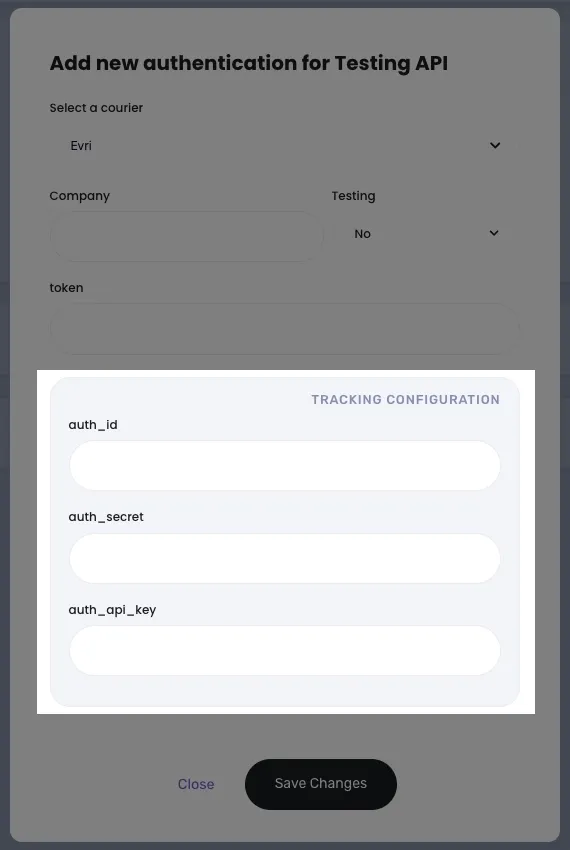
Click to Maximise the Image.

By completing this setup, Voila will automatically retrieve and display tracking updates for your shipments. For troubleshooting or additional courier configurations, refer to the Courier Integration Guide or contact Voila Support.

Couriers Requiring Additional Tracking Details
The following couriers require extra credentials for tracking integration:
Evri
Evri Corporate
Royal Mail
Royal Mail Click & Drop
Royal Mail Intersoft
Hermes
Hermes Corporate
FedEx V2
Next Steps & Support
📚 Need help? Explore more of our documentation, video walkthroughs or contact support.
With Voila, you will be set up for seamless, efficient shipping.